The terminal, built around the task

Stay in the terminal. Keep the task moving.

Queue follow-ups, attach files, annotate images, and switch between Claude Code and Codex — with the controls you need around the task terminal.

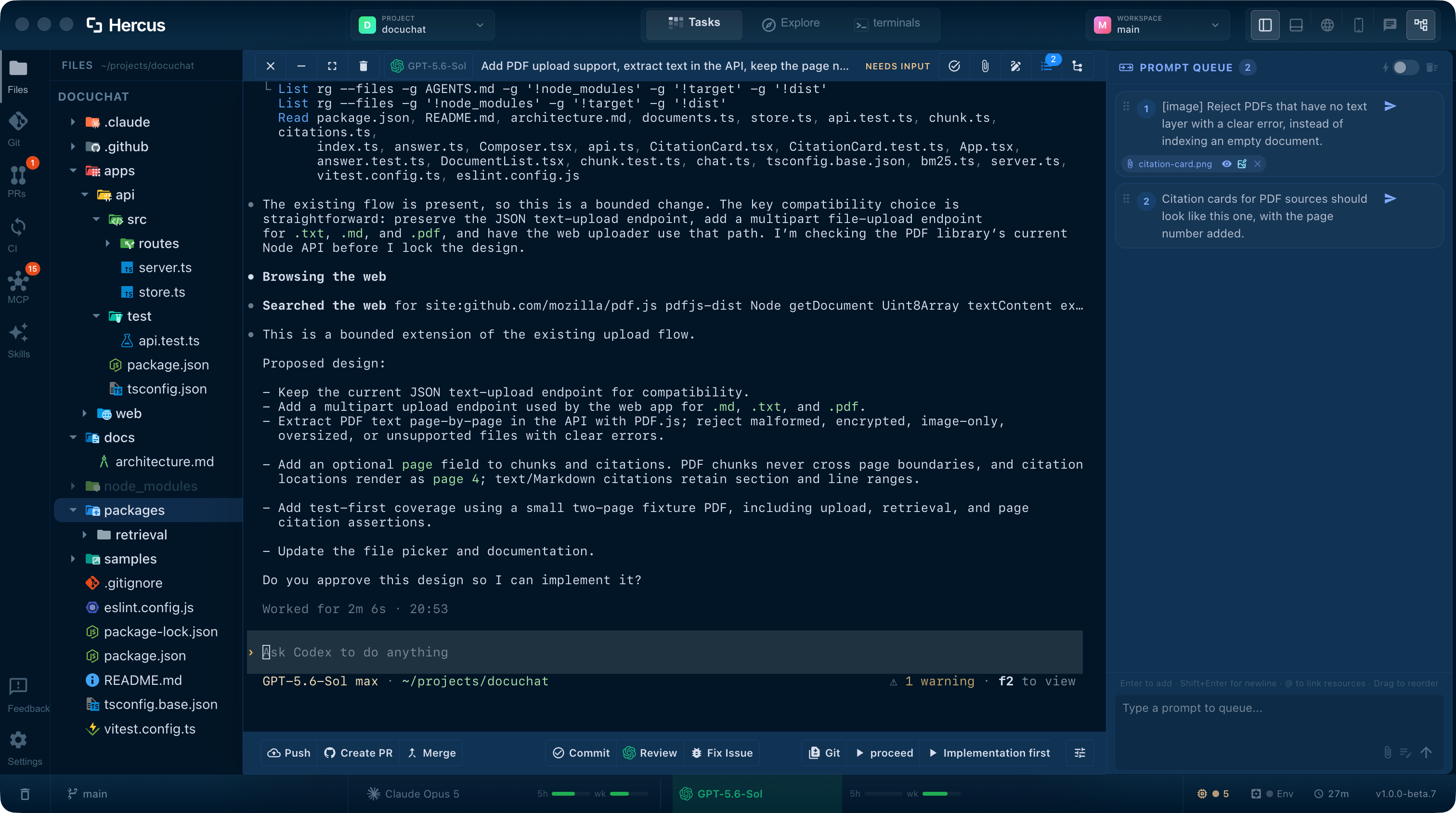
A Hercus task where Codex has proposed a design and is waiting for approval, with two follow-up prompts queued beside it, one with an attached image.
Hercus · The task terminal

The prompt, its evidence, and the next step stay close to the terminal — so you can keep directing the work.

Try it in your workspace

The real scenario

This is where you are.

A real situation, and what it costs you today.

The situation

You're in the middle of a coding session when you spot the next change. You have a screenshot to mark up, a file to reference, and a follow-up to send once the current turn is done. You may also want a different provider to take the next pass.

Without Hercus

In a bare terminal, the small jobs around a task become separate work: keeping follow-ups in notes, preparing images elsewhere, and rebuilding context for another provider. Staying close to the code shouldn't mean doing all the coordination yourself.

With Hercus

Here's how
it actually flows.

Same scenario. No friction between the steps.

  1. Keep working in the task's terminal. Add files and images to a prompt, and annotate an image to show exactly what you want changed. The status bar keeps Claude Code and Codex usage in view.

  2. Queue the next instructions while the current turn runs. Edit or reorder them as the work develops, then send one yourself or enable auto-send for the next eligible prompt when the task needs input.

  3. Switch between Claude Code and Codex from the task's terminal controls when you want a different approach. Hercus prepares context for a new provider session; long conversations may need recent context or a condensed handoff.

  4. When an agent delegates work, open the child task to see its provider, model, state, and updates while keeping the main conversation focused.

What makes it work

The details that matter.

Queue work without waiting

Capture follow-ups while the current turn is running. Keep their files with them, change the order, and choose manual delivery or auto-send when the task is ready for input.

Put the detail in the prompt

Attach the relevant files and images, then mark up an image to pinpoint a change. You can also annotate an image that's already in a queued prompt.

Shortcuts where you're working

Reply with selected terminal output, clear the current input, or interrupt a running turn from the terminal menu. Reuse shortcut prompts for repeat requests instead of typing them again.

See for yourself

Try one real task.

Queue follow-ups, attach files, annotate images, and switch between Claude Code and Codex — with the controls you need around the task terminal.

Download Hercus

Make your next project a Hercus project

Bring the task. Keep it moving.

Try the whole workspace on your own code.

7-day free trial No credit card required