The situation
A task needs access to an external service, and you want the review to follow your team's checklist. The connection settings are in one config file; the instructions that worked last time are buried in a conversation.
Your tools and know-how, ready for the work
Connect external tools through MCP and turn repeat instructions into reusable skills. Manage both inside Hercus, so your setup and way of working don't live in scattered config files and old prompts.
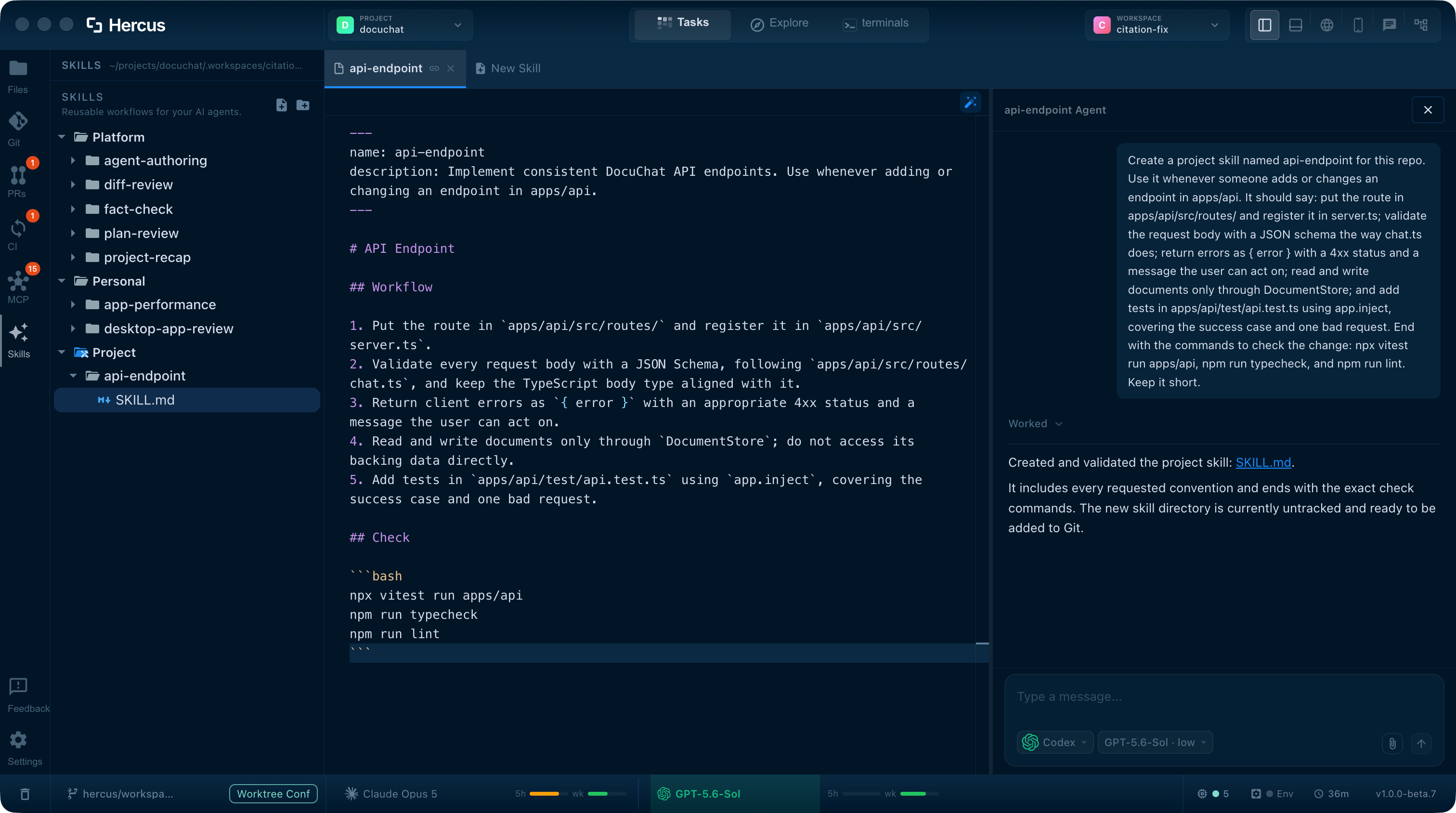
Keep tool connections manageable and turn useful instructions into something you can reuse. Start the next task with less setup to repeat.
Try it in your workspaceThe real scenario
A real situation, and what it costs you today.
The situation
A task needs access to an external service, and you want the review to follow your team's checklist. The connection settings are in one config file; the instructions that worked last time are buried in a conversation.
Without Hercus
You keep looking up tool settings and repeating the same guidance. Switching projects or providers adds another place to check whether the right connection and instructions are available.
With Hercus
Same scenario. No friction between the steps.
Open MCP Servers to search the MCP Registry, configure a connection, or add your own server through the form or a JSON configuration. Supply the settings the server needs, then manage it from the same panel.
In Skills, choose Personal for guidance you use across projects, or Project for instructions specific to a codebase. These skills are available to Claude Code and Codex in their chosen scope.
Describe a repeat workflow to the skill-building assistant — a review checklist, testing routine, or commit convention. Inspect the resulting skill files in the editor, make your own changes, and ask the assistant to refine them as your workflow evolves.
What makes it work
Add a local command or a server URL, with the environment variables or headers it requires. Enable or disable configured servers and return to their settings when your setup changes.
Test configured servers, inspect reported health and errors, and open logs when available. Authentication-required notices distinguish a sign-in step from a working connection; some services require authentication through Claude Code or Codex.
Organize your personal and project skills into groups, rename them as workflows change, and open their files to see the instructions you're reusing. Your own guidance stays separate from Hercus's read-only built-in skills.
See for yourself
Connect external tools through MCP and turn repeat instructions into reusable skills. Manage both inside Hercus, so your setup and way of working don't live in scattered config files and old prompts.
Download HercusMake your next project a Hercus project
Try the whole workspace on your own code.
7-day free trial No credit card required