Desktop workspace for agentic software development
Run Claude Code and Codex in parallel. See what needs you. Review what changed.
Use Claude Code and Codex on your own repository, with terminals, a browser, Git, and pull requests built in. Run independent tasks in parallel, pass plans and context between them, and keep the work connected—from the first instruction to the final review.
Use one agent or both, on a repository you already have.
7-day free trial No credit card required
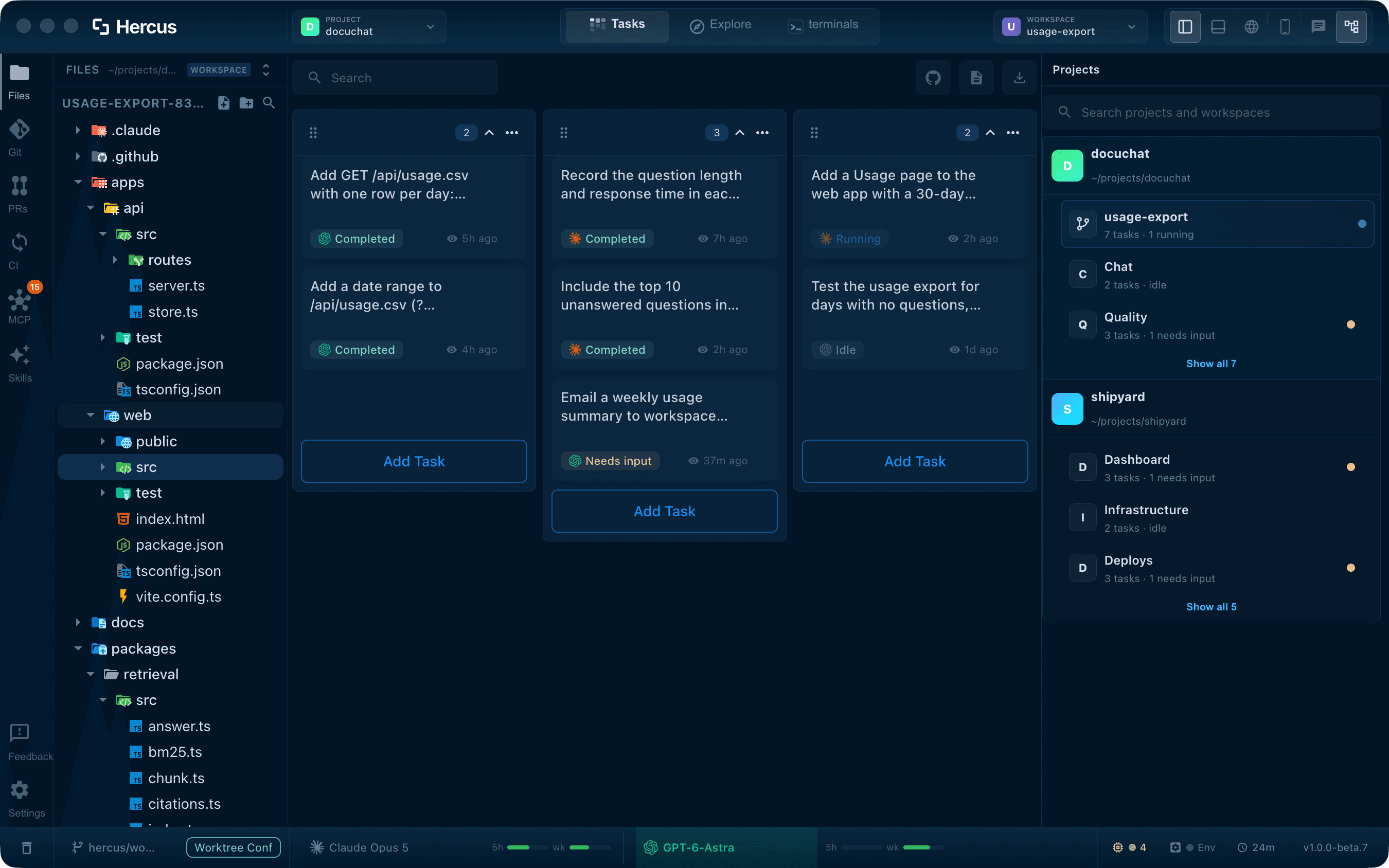
One place to follow the work.
See your project files and tasks together. Know what is running, what is finished, and what needs your input.
Why Hercus
Your development tools are all over the place.
Building software means moving between an editor, terminals, a browser, Git, and pull requests. Now your coding agents run in windows of their own too.
Each tool holds part of the work. The plan sits in one agent session and the change in another. Your running app is in the browser, and the review is on GitHub. Moving to the next step means finding the right window, carrying the context over, and explaining what already happened.
Run eight agents at once and it compounds: which one finished, which one is stuck on a question, and which diff you still haven't read.
You end up as the clipboard between your own tools.
Meet your workspace
One workspace for all of it.
Hercus puts Claude Code and Codex in the same window as your project files, terminals, browser, iOS simulator, Git, and pull requests.
Read the files, run a command, check the running app, and review the change, without switching apps between steps.
Add an agent without adding a window.
Explore the codebase with one agent while another works on an independent change, and follow both from the same project overview.
Let agents use the browser.
An agent can open your running app in the built-in browser, click through a flow, fill forms, and inspect the page, in the same tabs you see.
Let agents use your computer.
Allow Computer Use in macOS and an agent can see and work in your other desktop apps. You decide whether it only observes or can also click and type.
Start with the project you already have.
Open an existing repository and create a task, or draft one from a GitHub issue.
What you can do
From the first task to the merged change.
Each part has its own section in the product tour.
- Your workspace Run Claude Code and Codex across your tasks, with separate workspaces for independent changes.
- Task terminals Queue follow-ups while a task runs, and hand a plan from one agent to the other.
- Browser & simulator Open the running app beside the task, and attach what is broken straight to it.
- Git operations Review the diff, stage what belongs, and commit without leaving the workspace.
- PRs, CI & conflicts Open pull requests, read failed CI runs with their logs, and resolve conflicts.
- Saved dev commands Save your dev servers and test watchers once, and let them start on their own when the project opens.
- MCP & skills Write a skill once, connect MCP tools, and use them in every task.
Compared with your setup
Already running agents in terminals?
Here is what Hercus adds to that setup.
Claude Code and Codex can already run in parallel. What does Hercus add?
They run the agents. Hercus is the workspace around them: an overview of your tasks and which ones need you, plans handed from one agent to the other, the running app in a built-in browser or iOS simulator, and the diff, pull request, and CI run in the same workspace. Your agent subscriptions stay as they are.
Guide: managing several Claude Code sessionsI already use tmux and Git worktrees.
That setup works, and plenty of developers run it well. Hercus is for when you would rather stop maintaining it: task status without custom scripts, queued follow-ups, handoffs between agents, and the app, pull requests, and CI alongside your terminals.
Won't parallel agents overwrite each other's changes?
Not when each change has its own workspace. A workspace can have its own managed Git worktree and branch, so its agents work in a separate working copy. Tasks inside one workspace share its files, so put unrelated changes in separate workspaces.
Do agents stop to ask before every command?
No. Tasks run with full access, the same as skipping permission prompts in a terminal, so a task keeps working while you are in another one. It needs you when it has a question, a plan to approve, or a change to review.
Simple pricing
Keep your agents.
Connect the rest.
One plan includes the full workspace: task coordination, context handoffs, development tools, app inspection, and Git and pull request review.
Your Hercus subscription pays for the workspace. Your agent subscriptions and usage are separate.
$20/ month USD
Or $200 / year· Save $40
7-day free trial · No credit card required · Cancel anytime
Full pricing detailsCan I use an existing project?
Yes. Open your repository, set up Claude Code or Codex, and start a task. You can also prepare a draft task from a GitHub issue, reuse project instructions and skills, and configure MCP connections for additional tools.
Can I use my existing skills and MCP servers?
Yes. Hercus finds the skills and MCP connections you already have in Claude Code and Codex and brings MCP setup into one panel. Skills and servers you manage in Hercus work with both agents. Anything tied to one agent, such as its credentials, stays with that agent.
What platforms are supported?
Hercus is available for macOS on Apple Silicon. Windows is coming soon. Linux is coming soon.
How much does it cost after the trial?
After the 7-day free trial, full workspace access costs $20/month or $200/year. Annual billing saves $40. No credit card is required to start the trial. Agent subscriptions and usage are not included in the Hercus price.
Can I use my Claude Pro or ChatGPT plan?
Yes. Hercus runs the Claude Code or Codex you are already signed in to on your Mac, so your existing plan or API access applies, along with that vendor's usage limits. Hercus does not sell model usage.
Try it on your own code
Your next task, in one workspace.
Use your own repository and the Claude Code or Codex subscription you already have.
7-day free trial No credit card required