Workflow guide
Run multiple Claude Code agents at once without losing track
Starting another Claude Code session takes seconds. Keeping track of six of them across three repos is the hard part. This guide is for developers running Claude Code in more than one repo. By the end, every session sits under its repo and feature, you can see at a glance which ones need you, and each change is ready to review where it was made.
By Brian Kibet, founder of Hercus Reviewed
The short answer
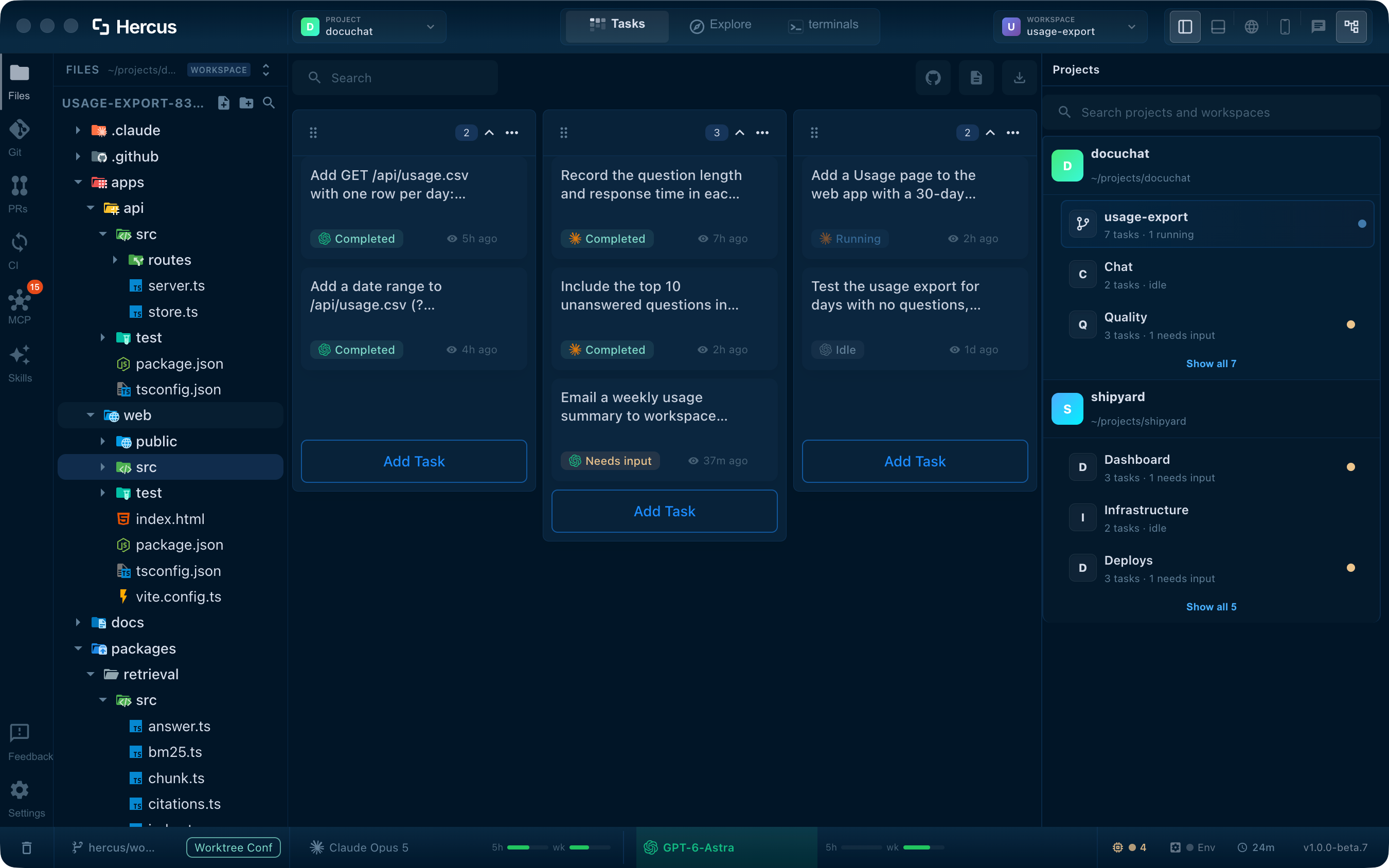
Group your sessions by repository and by feature, give each feature its own branch when it needs one, and make every session's state visible so you only open the ones that need you. In Hercus, each repo is a project, each feature gets a workspace, every Claude Code task shows whether it's running, waiting for your input or finished, and a task can split its work into Claude Code subtasks. It runs on Macs with Apple Silicon.
Why it gets hard
One session is easy to follow. The trouble starts when a feature in one repo, a bug fix in another and a refactor in a third are all running at once, and some of them need more than one agent.
We hit this ourselves, working in real company codebases. We had several repos open at once, each with its own feature work, and some features running two or three agent threads. The Claude and Codex desktop apps made all of that hard to keep track of. These were the symptoms:
- You can't tell which project a session belongs to without opening it.
- You can't see which sessions are still working and which are waiting on you.
- Two sessions edit the same files and overwrite each other's changes.
- When a session finishes, you rebuild the context before you can review it.
Set it up in Hercus
Before you start, install Claude Code or Codex and sign in, so Hercus can run them. Then do this once for each repo you work in.
-
Open each repo as a project
Add every repository you work in. Each one becomes its own project, so its sessions never mix with another repo's.
You'll see: Your repos listed in the Projects panel.
In the docs: Add a project
-
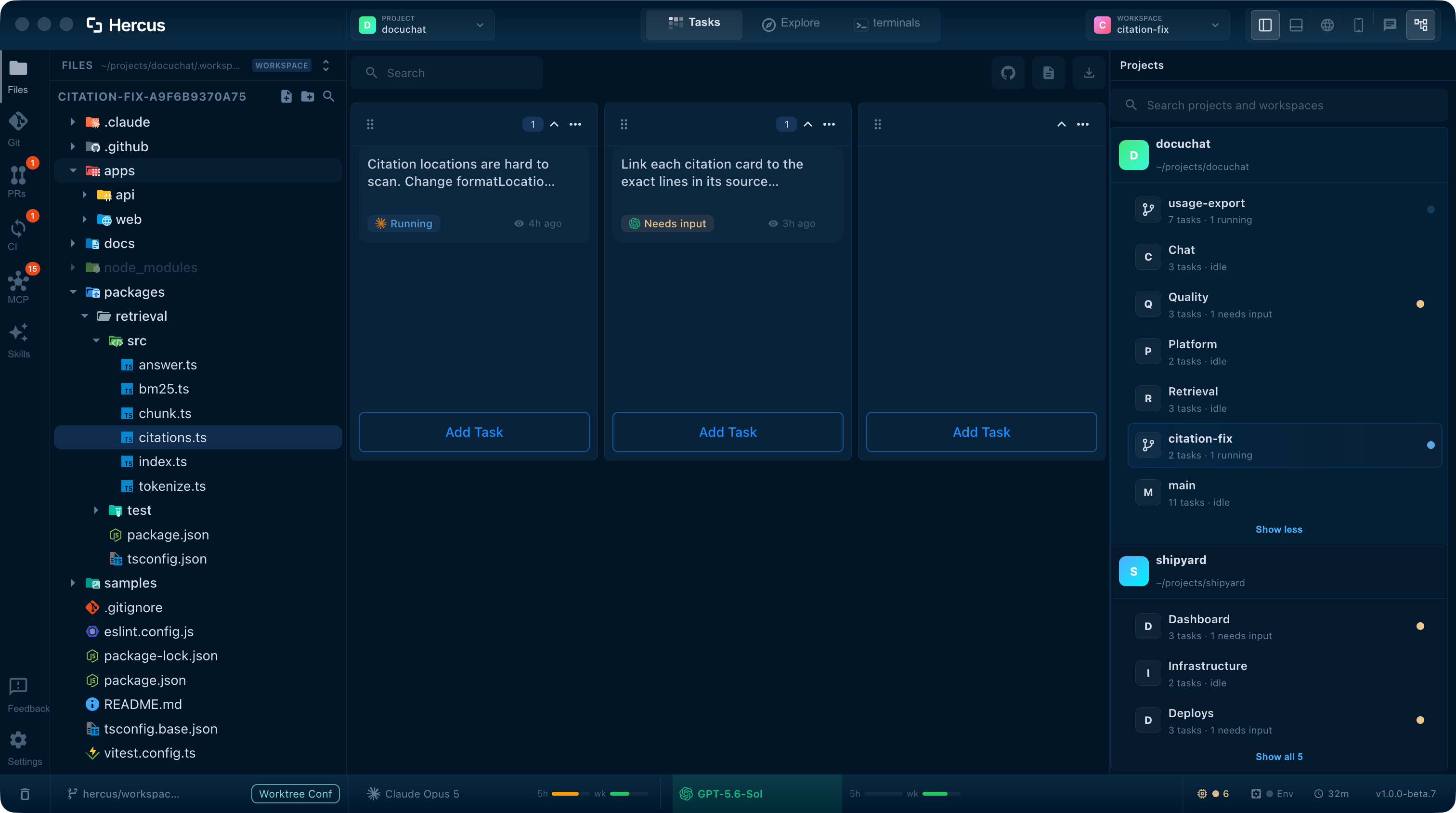
Create a workspace for each feature
Inside the project, create a workspace for the feature. New workspaces use the repo's own files by default. When a feature needs its own branch and files, choose a worktree instead and pick the branch it starts from.
You'll see: The workspace under its project, on its own branch if you chose a worktree.
In the docs: Give a change its own branch
-
Start a task with Claude Code
Add a task to the workspace and give it one clear job. New tasks use your default agent, so make Claude Code the default in Settings, under Agents. If a feature needs two sessions, add two tasks. Tasks in the same workspace share its files, so give each one a separate part of the work.
You'll see: The task in the workspace, marked Running.
In the docs: Create a task
-
Open only what needs you
Every task is marked Running, Needs input or Completed through hooks Hercus adds to Claude Code's settings, and each workspace counts how many of each it has. Check the counts, open the tasks that need input, and leave the rest working.
You'll see: The workspaces where your input is needed, without opening each task.
In the docs: Task status
-
Let a task split the work
Ask a Claude Code task to split a job, for example: "Split this into two Claude Code subtasks, one for the API and one for its tests, and review their changes when they finish." It starts the subtasks, sends their instructions and reads their results, and Hercus tells it when each one finishes.
You'll see: The subtasks listed under the task that started them.
In the docs: Ask for subtasks
-
Queue your next instruction
When you think of the next step while an agent is still busy, add it to the task's follow-up queue. With auto-send on, Hercus sends it as soon as the task needs input.
You'll see: Your instruction waiting under the task, sent when the agent is ready for it.
In the docs: Queue follow-up instructions
Review each change where it was made
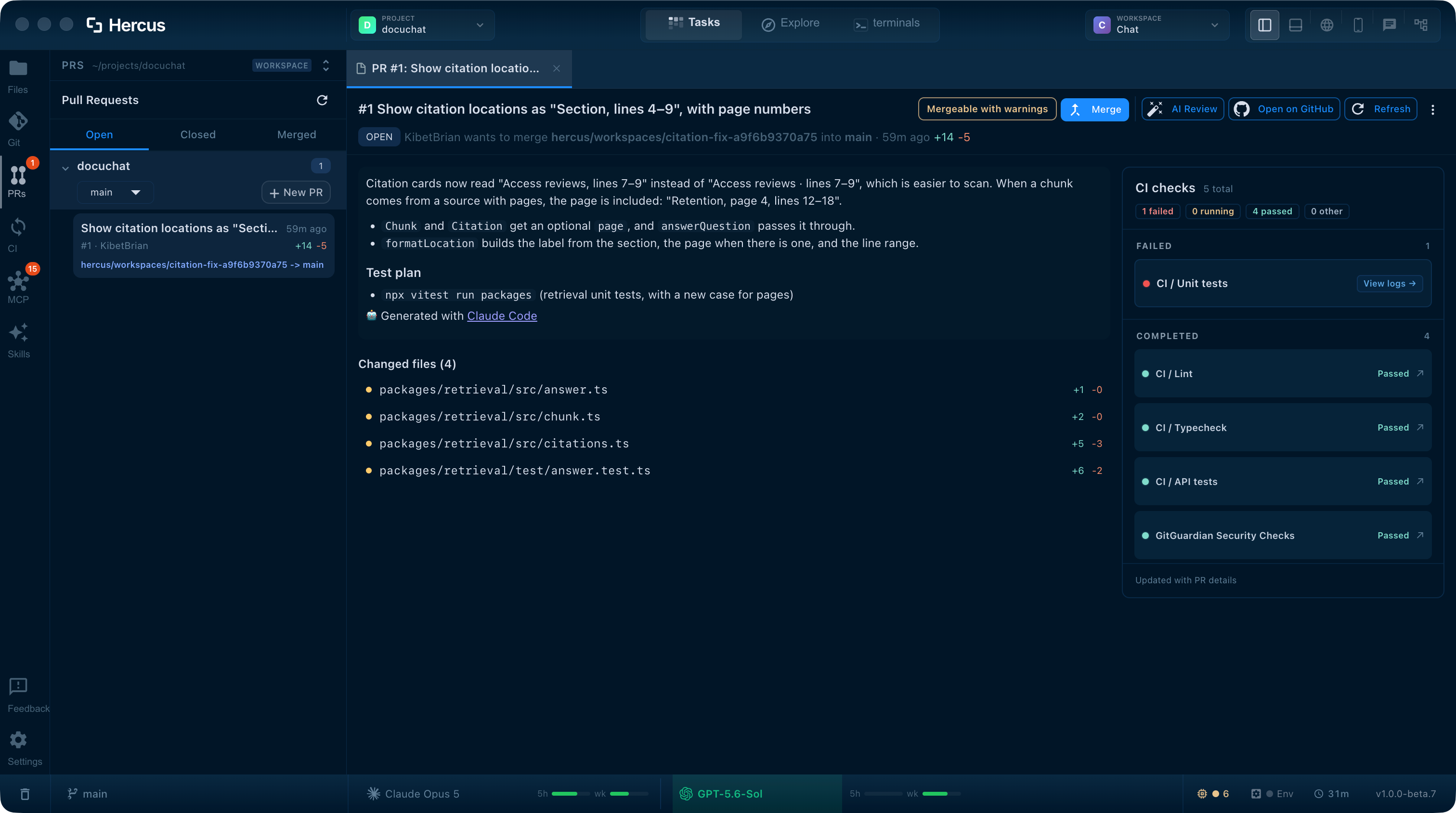
When a task finishes, its changes are already in its workspace. Read the diff, stage the parts you want, and commit. Then prepare a pull request, check the CI results, and open the logs of anything that failed.
Hercus never merges anything on its own. Publishing a pull request and merging it are buttons you press when you're ready.
- Stage by hunk and commit from the Git panel.
- Prepare a pull request from your commits, or open an existing one.
- Read CI logs and ask the assistant to investigate a failed check.
- Resolve merge conflicts in a separate workspace before you publish.
In the docs: Git, Pull requests, CI
See the details
Each part of this guide has its own page with more screenshots and specifics.
- Your workspace
Projects, workspaces, task states and activity counts.
- Task terminals
Queued follow-ups, auto-send, and switching a task between Claude Code and Codex.
- Git operations
Diffs, staging by hunk, and commits next to the work that made them.
- PRs, CI & conflicts
Pull requests, CI logs and conflict resolution.
Frequently asked questions
Doesn't Claude Code already show all my sessions?
Partly. Claude Code's Agent view lists your background Claude Code sessions across projects and shows which ones need you, are still working or are done. The Claude Code Projects beta has Claude coordinate the work itself, as threads that usually run in Anthropic's cloud on your GitHub repositories. Hercus runs Claude Code and Codex from your Mac, gives each feature its own workspace under its repo, and keeps each change's diff, pull request and CI checks in the same window. If you work in one repo with Claude alone, Agent view may be all you need.
Sources: Anthropic's Agent view docs, Anthropic's Projects docs
Can Claude Code run multiple agents at once?
Yes. Claude Code can hand side tasks to subagents inside one session, run background sessions you follow in agent view, and coordinate a group of sessions with agent teams, which are experimental. Its Projects beta runs threads in the cloud. Hercus adds one board across your repos, with each task under its repo and feature, Claude Code subtasks you can open and follow, and your dev servers, browser and pull requests in the same window.
Do I need Codex too?
No. Hercus works with Claude Code alone. If you also use Codex, you can hand a task from one to the other and keep your skills and MCP setup available to both.
What happens to my sessions when I restart my Mac?
They come back. Hercus starts at login by default and reopens each Claude Code task with its conversation, as long as Claude Code still has it saved. Tasks in your current workspace resume straight away, and the rest when you open them. An agent that was mid-step is told to continue where it left off. Commands running in a terminal don't survive a restart: you get a fresh shell in the same folder.
Does every session get its own worktree?
No. A worktree belongs to a workspace, not to a single task. Tasks in a workspace share its files, so create a separate workspace for each feature that needs its own branch and working copy.
How much does Hercus cost?
Hercus is free for 7 days, with no credit card. After that it's $20 a month or $200 a year. Your Claude plan is billed separately by Anthropic.
Related guides
Restart your Mac without losing your Claude Code and Codex sessions
Some developers go months without restarting because a reboot means reopening a dozen windows, finding every agent conversation and explaining again what each one was doing. This guide is for anyone running several Claude Code or Codex sessions. By the end, you can quit or restart whenever you need to, and your tasks come back under their projects with their conversations.
WorkflowRun multiple Codex agents at once without losing track
Starting another Codex session takes seconds. Running a dozen of them across terminal tabs, VS Code windows and repos is where it falls apart. This guide is for developers who run Codex on its own, in the CLI or the IDE extension, across several repos. By the end, every Codex task sits under its repo and feature, you can see which ones need you, and a Codex task can split its work into subtasks that report back.
WorkflowUse Claude Code and Codex together without running two setups
Plenty of developers use both agents: Claude Code for some tasks, Codex for others, and whichever still has plan left when the other runs low. Using both usually means two terminals or apps, two sets of skills and MCP servers, two usage limits to watch, and copying context across by hand every time you switch. This guide is for developers who use both, or want to. By the end, each task runs on the agent you choose, you can hand a task from one to the other, and both agents share one setup.
Stop hunting for the right session
Download Hercus for Mac, open the repos you already work in, and give each feature its own workspace. Free for 7 days, no credit card needed.
Choose your platform