Workflow guide
Use Claude Code and Codex together without running two setups
Plenty of developers use both agents: Claude Code for some tasks, Codex for others, and whichever still has plan left when the other runs low. Using both usually means two terminals or apps, two sets of skills and MCP servers, two usage limits to watch, and copying context across by hand every time you switch. This guide is for developers who use both, or want to. By the end, each task runs on the agent you choose, you can hand a task from one to the other, and both agents share one setup.
By Brian Kibet, founder of Hercus Reviewed
The short answer
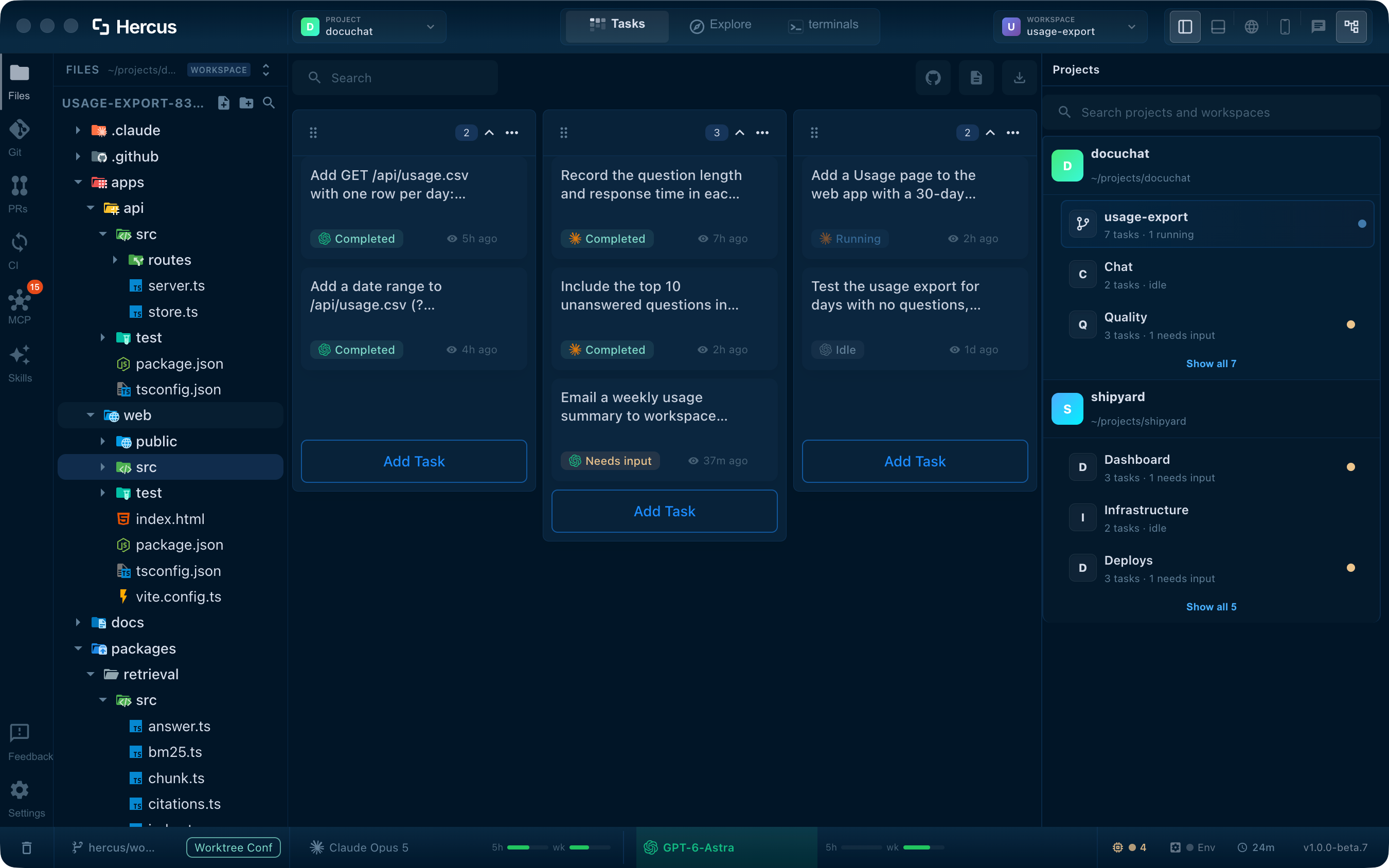
Give each task to the agent that suits it, and keep both in one place. In Hercus you choose Claude Code or Codex for every task, run them side by side in the same project, hand a task from one to the other with its context, and use the same skills and MCP servers with both. The status bar shows how much of each plan's 5-hour and weekly limit you've used. Hercus runs the Claude Code and Codex you're already signed in to, so your existing plans work.
Why using both gets messy
Many developers prefer Claude Code for some work and Codex for other work, or switch when one plan runs low. The trouble is that each agent lives in its own terminal or app, with its own settings, its own tools and its own limits.
These are the costs of running them apart:
- Two places to check, so you never see what both agents are doing at once.
- Two setups, with skills and MCP servers configured twice and drifting apart.
- Two limits, so one plan runs out mid-task and you start over in the other.
- Switching means copying the plan, the files and the decisions so far by hand.
Set up both agents in Hercus
Install Claude Code and Codex and sign in to each first. Hercus runs the agents you're signed in to, so your Claude and ChatGPT plans work as they are.
-
Open your repo as a project
Add the repository once. Both agents work in it, so their tasks sit side by side under the same project.
You'll see: Your repo in the Projects panel.
In the docs: Add a project
-
Choose the agent for each task
When you add a task, choose Claude Code or Codex for it. Use one to explore or plan and the other to make the change, or pick whichever you prefer for that kind of work.
You'll see: Each task card marked with its agent's icon next to its status.
In the docs: Create a task
-
Run them side by side
Tasks in the same workspace share its files, so give each agent a separate part of the work. When both need to change the same code, put each in its own workspace with its own worktree and branch.
You'll see: Both agents' tasks in view, each marked Running, Needs input or Completed.
In the docs: Give a change its own branch
-
Hand a task to the other agent
From the task's terminal controls, switch the task to the other agent. Hercus prepares context for the new session: the objective, the relevant files and enough of the conversation to carry on. A long conversation may arrive condensed, so check that the new agent has what it needs.
You'll see: The same task, now running on the other agent.
In the docs: Agents
-
Watch both plans' limits
The status bar shows how much of each plan's 5-hour and weekly limit you've used. Hover over a bar to see when it resets, and give the next task to the other agent before one runs out.
You'll see: Two bars for each agent, marked 5h and wk.
One setup for both agents
Hercus finds the skills and MCP servers you already have in Claude Code and Codex, and brings MCP configuration into one panel. Skills and servers that Hercus manages work with both agents, so you set them up once.
Some provider-specific tools, credentials and settings won't carry over unchanged, so review them once when you start.
In the docs: MCP servers, Skills
See the details
Each part of this guide has its own page with more screenshots and specifics.
- Task terminals
Switching a task between Claude Code and Codex, and both agents' usage in the status bar.
- MCP & skills
One skills library and one MCP panel for both agents.
- Your workspace
Both agents' tasks under one project, with their states.
Frequently asked questions
Which is better, Claude Code or Codex?
It depends on the task and on your plan. Many developers use both: one for the work it does best for them, the other when the first is busy or low on usage. Hercus lets you run both on the same repo and compare the results, without setting up two tools.
Can Claude Code and Codex work on the same repo at the same time?
Yes. Give them separate parts of the work in one workspace, or put each in its own workspace with its own worktree when they'd touch the same files. Separate branches can still conflict when you merge them.
Can I use my Claude Pro and ChatGPT plans?
Yes. Hercus runs the Claude Code and Codex you're signed in to on your Mac, so your existing plans or API access apply, along with each vendor's usage limits. Hercus doesn't sell model usage.
How much does Hercus cost?
Hercus is free for 7 days, with no credit card. After that it's $20 a month or $200 a year. Your Claude Code and Codex subscriptions are billed separately.
Related guides
Run multiple Claude Code agents at once without losing track
Starting another Claude Code session takes seconds. Keeping track of six of them across three repos is the hard part. This guide is for developers running Claude Code in more than one repo. By the end, every session sits under its repo and feature, you can see at a glance which ones need you, and each change is ready to review where it was made.
WorkflowRestart your Mac without losing your Claude Code and Codex sessions
Some developers go months without restarting because a reboot means reopening a dozen windows, finding every agent conversation and explaining again what each one was doing. This guide is for anyone running several Claude Code or Codex sessions. By the end, you can quit or restart whenever you need to, and your tasks come back under their projects with their conversations.
WorkflowRun multiple Codex agents at once without losing track
Starting another Codex session takes seconds. Running a dozen of them across terminal tabs, VS Code windows and repos is where it falls apart. This guide is for developers who run Codex on its own, in the CLI or the IDE extension, across several repos. By the end, every Codex task sits under its repo and feature, you can see which ones need you, and a Codex task can split its work into subtasks that report back.
Put both agents to work
Download Hercus for Mac, sign in to Claude Code and Codex, and give each task the agent that suits it. Free for 7 days, no credit card needed.
Choose your platform