Workflow guide
Run multiple Codex agents at once without losing track
Starting another Codex session takes seconds. Running a dozen of them across terminal tabs, VS Code windows and repos is where it falls apart. This guide is for developers who run Codex on its own, in the CLI or the IDE extension, across several repos. By the end, every Codex task sits under its repo and feature, you can see which ones need you, and a Codex task can split its work into subtasks that report back.
By Brian Kibet, founder of Hercus Reviewed
The short answer
Yes, you can run several Codex agents at once. Give each session its own worktree so they don't edit the same files, and watch for the ones waiting on your approval. OpenAI's ChatGPT desktop app does this with worktree chats. If you run Codex in terminals or VS Code instead, Hercus gives you one board for all of it: each repo is a project, each feature a workspace, every Codex task shows Running, Needs input or Completed, and a task can split its work into Codex subtasks.
Where many Codex sessions break down
One Codex session is easy to follow. Ten are not, especially when they're spread across terminal tabs, VS Code instances and repos, and any of them may be waiting for an approval you haven't seen.
These are the usual symptoms:
- No single list of your Codex sessions, so you check each window in turn.
- A session sits waiting for an approval while you look at another one.
- Two sessions in one checkout edit the same files.
- Your plan's usage runs out in the middle of a task.
- After a restart, you find each session again with codex resume.
Set it up in Hercus
Install Codex and sign in first. Hercus runs the Codex you're signed in to, so your ChatGPT plan works as it is.
-
Open each repo as a project
Add every repository you work in. Each one becomes its own project, so its Codex sessions never mix with another repo's.
You'll see: Your repos listed in the Projects panel.
In the docs: Add a project
-
Make Codex your default agent
Open Settings, go to Agents and select Set as default for Codex. New tasks then start on Codex without you choosing it each time.
You'll see: Codex marked as your default agent.
In the docs: Choose an agent for a task
-
Give each feature a workspace
Inside the project, create a workspace for each feature. Choose a worktree when a feature needs its own branch and files, so its Codex sessions don't touch another feature's checkout.
You'll see: Each feature under its project, on its own branch if you chose a worktree.
In the docs: Give a change its own branch
-
Start one Codex task per job
Add a task to the workspace and give it one clear job. Hercus follows each task through hooks it adds to Codex's settings, so every task shows Running, Needs input or Completed without you opening it.
You'll see: Your Codex tasks on the board, each with its status.
In the docs: Hooks
-
Let a task split the work
Ask a Codex task to split a job, for example: "Split this into three Codex subtasks, one for each endpoint, and review their changes when they finish." It starts the subtasks, sends their instructions and reads their results, and Hercus tells it when each one finishes.
You'll see: The subtasks listed under the task that started them.
In the docs: Ask for subtasks
-
Keep them moving
Queue your next instruction while Codex is busy, and turn on auto-send to send it as soon as the task needs input. The status bar shows how much of your plan's 5-hour and weekly limit you've used, and Keep computer awake while agents are running stops your Mac sleeping mid-task.
You'll see: Your next instruction waiting under the task.
In the docs: Queue follow-up instructions
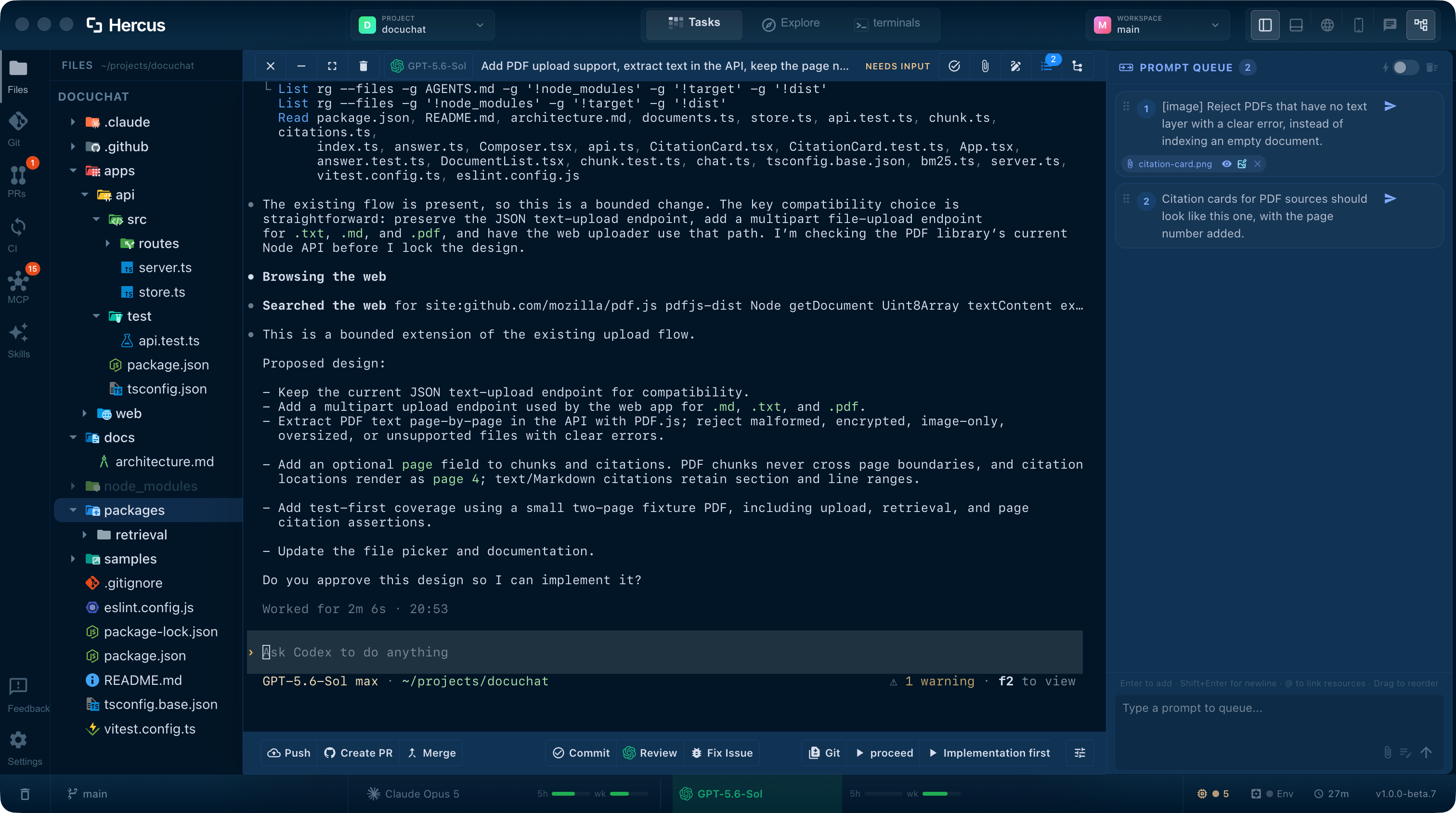
Review each change where it was made
When a Codex task finishes, its changes are already in its workspace. Read the diff, stage what belongs and commit, then prepare a pull request and check its CI results without leaving Hercus.
Hercus never merges anything on its own. Publishing a pull request and merging it are buttons you press when you're ready.
In the docs: Git, Pull requests, CI
See the details
Each part of this guide has its own page with more screenshots and specifics.
- Your workspace
Projects, workspaces, task states and activity counts.
- Task terminals
Queued follow-ups, auto-send and Codex usage in the status bar.
- PRs, CI & conflicts
Pull requests, CI logs and conflict resolution.
Frequently asked questions
Doesn't the ChatGPT desktop app already run Codex agents in parallel?
Yes. OpenAI's ChatGPT desktop app runs Codex chats side by side, each in its own worktree if you choose. Hercus is for running Codex in a terminal for each task across many repos, with each task under its repo and feature, and your dev servers, browser and pull requests in the same window. If the ChatGPT desktop app covers your work, you may not need Hercus.
Sources: OpenAI's worktrees guide
Can Codex run multiple agents at once?
Yes. Inside one session, Codex can hand parts of the work to subagents; in the CLI, /subagents lets you inspect and switch between them. You can also run several Codex sessions side by side, each in its own worktree. In Hercus, a Codex task can start Codex subtasks that you can open and follow.
Sources: OpenAI's subagents guide
Do I need Claude Code too?
No. Hercus works with Codex alone. Claude Code is there if you ever want to try it on a task.
Can I use my ChatGPT plan?
Yes. Hercus runs the Codex you're signed in to on your Mac, so your ChatGPT plan or API access applies, along with its usage limits. Hercus doesn't sell model usage.
How much does Hercus cost?
Hercus is free for 7 days, with no credit card. After that it's $20 a month or $200 a year. Your Codex usage is billed separately by OpenAI.
Related guides
Run multiple Claude Code agents at once without losing track
Starting another Claude Code session takes seconds. Keeping track of six of them across three repos is the hard part. This guide is for developers running Claude Code in more than one repo. By the end, every session sits under its repo and feature, you can see at a glance which ones need you, and each change is ready to review where it was made.
WorkflowUse Claude Code and Codex together without running two setups
Plenty of developers use both agents: Claude Code for some tasks, Codex for others, and whichever still has plan left when the other runs low. Using both usually means two terminals or apps, two sets of skills and MCP servers, two usage limits to watch, and copying context across by hand every time you switch. This guide is for developers who use both, or want to. By the end, each task runs on the agent you choose, you can hand a task from one to the other, and both agents share one setup.
WorkflowRestart your Mac without losing your Claude Code and Codex sessions
Some developers go months without restarting because a reboot means reopening a dozen windows, finding every agent conversation and explaining again what each one was doing. This guide is for anyone running several Claude Code or Codex sessions. By the end, you can quit or restart whenever you need to, and your tasks come back under their projects with their conversations.
Run all your Codex agents from one place
Download Hercus for Mac, sign in to Codex, and give each feature its own workspace. Free for 7 days, no credit card needed.
Choose your platform